Coordination Types
Vitessce defines several coordination types upon which views can be coordinated via the view config. The coordination types found on this page are all valid values for the keys of the coordinationSpace object in the view config.
Initial coordination values
Coordination values may be defined in the coordinationSpace object in the view config upon the initial load of Vitessce.
To simplify the configuration process for the most common use cases of Vitessce, coordination values are automatically initialized where possible. There are multiple mechanisms by which automatic initialization of coordination values can occur. In general, when user-defined coordination values are present in the configuration, the user-defined values will take precedence over automatically-initialized values.
Default values
Every coordination type is accompanied by a default value. During initialization of the view config (prior to any views being rendered or data being loaded), default values are filled in for any views that use the coordination type but lack a coordination value/scope mapping. This process is limited to a single level of coordination and cannot account for data-dependent values.
Data-dependent values (single-level)
Each data loader may return a coordinationValues object from its load method, which looks like:
{
    someCoordinationType: 'someInitialValue',
}
The values in this object will be used if the view config does not specify a value for the coordination type (i.e., if the initial value is null or undefined).
Data-dependent values (multi-level)
Multi-level coordination initialization is complex as it relies on meta-coordination.
For views that support multi-level coordination, the coordinationValues object returned by a data loader class may contain CoordinationLevel (CL) objects:
{
    primaryCoordinationType: CL([
        {
            secondaryCoordinationType: 'someInitialValue',
        },
    ]),
}
This will be automatically expanded into:
{
    primaryCoordinationType: {
        'init_{datasetUid}_{dataType}_0': '',
    },
    secondaryCoordinationType: {
        'init_{datasetUid}_{dataType}_0': 'someInitialValue',
    },
    metaCoordinationScopes: {
        'init_{datasetUid}_{dataType}_0': {
            primaryCoordinationType: ['init_{datasetUid}_{dataType}_0'],
        },
    },
    metaCoordinationScopesBy: {
        'init_{datasetUid}_{dataType}_0': {
            primaryCoordinationType: {
                secondaryCoordinationType: {
                    'init_{datasetUid}_{dataType}_0': 'init_{datasetUid}_{dataType}_0',
                },
            },
        },
    }
}
The automatically-generated metaCoordinationScopes and metaCoordinationScopesBy scopes will be mapped to views by prepending them so that existing meta-coordination takes precedence.
If any of the automatically-generated scopes already exist (i.e., were user-defined), they will not be overwritten.
The generation of these coordination scope names is deterministic to enable the user to override their values manually if desired.
However, it is recommended to define all values when possible.
Data-dependent values via file options
In some cases, the initial value may be partially data-dependent.
Data loader classes may use values from the options property of a file definition to define the values in the coordinationValues object.
Whether this pattern is supported (and how) will depend on the implementation of each data loader class.
Multi-level coordination
The spatialBeta and layerControllerBeta views support multi-level coordination. They support the following hierarchies of coordination types:
imageLayerfileUidspatialLayerVisiblespatialLayerOpacityspatialLayerColormapspatialLayerTransparentColorspatialLayerModelMatrixvolumetricRenderingAlgorithmspatialTargetResolutionspatialSliceXspatialSliceYspatialSliceZphotometricInterpretationpixelHighlighttooltipsVisiblespatialChannelLabelsVisiblespatialChannelLabelsOrientationspatialChannelLabelSizespatialLayerLabelspatialChannelsSortOrderimageChannelspatialTargetCspatialChannelVisiblespatialChannelColorspatialChannelWindowspatialMaxResolution
segmentationLayerfileUidspatialLayerVisiblespatialLayerOpacityspatialLayerLabelsegmentationChannelobsTypespatialTargetCspatialChannelVisiblespatialChannelOpacityspatialChannelColorspatialSegmentationFilledspatialSegmentationStrokeWidthobsColorEncodingfeatureSelectionfeatureValueColormapfeatureValueColormapRangeobsSetColorobsSetSelectionadditionalObsSetsobsHighlighttooltipsVisibletooltipCrosshairsVisiblelegendVisible
spotLayerobsTypespatialLayerVisiblespatialLayerOpacityspatialLayerLabelspatialSpotRadiusspatialSpotFilledspatialSpotStrokeWidthobsColorEncodingfeatureSelectionfeatureValueColormapfeatureValueColormapRangeobsSetColorobsSetSelectionadditionalObsSetsspatialLayerColorobsHighlighttooltipsVisibletooltipCrosshairsVisiblelegendVisible
pointLayerobsTypespatialLayerLabelspatialLayerLabelspatialLayerVisiblespatialLayerOpacityspatialLayerOpacityUnselectedspatialLayerColorobsColorEncodingfeatureSelectionfeatureFilterModefeatureColorfeatureValueColormapfeatureValueColormapRangespatialPointStrokeWidthobsSetColorobsSetSelectionadditionalObsSetsobsHighlighttooltipsVisibletooltipCrosshairsVisiblelegendVisible
The neuroglancer view also supports the segmentationLayer and pointLayer hierarchies.
Descriptions
| Coordination type | Description |
|---|---|
fileUid | The uid of the file definition that supplies this layer's data. |
obsType | The observation type the layer represents, e.g. cell, spot or point. Used to match layers with data such as obs sets and features. In the Neuroglancer view, giving a point layer the same obsType as a segmentation layer marks the points as that segmentation's centroids. The centroids drive on-demand mesh loading (only meshes near the viewport are fetched), and obsColorEncoding: 'geneSelection' on those points becomes quantitative colormap coloring instead of per-feature colors. |
spatialLayerLabel | Display name for the layer in the layer controller. Defaults to the capitalized obsType. |
spatialLayerVisible | Whether the layer is rendered. |
spatialLayerOpacity | Layer opacity from 0 to 1. For point layers, per-feature and unselected opacities are multiplied by this value. |
spatialLayerOpacityUnselected | Point layers only. Opacity of points whose feature is not in featureSelection, relative to spatialLayerOpacity. See Point layer opacity. |
spatialLayerColor | Static RGB color ([r, g, b], 0–255) for spot and point layers. Used when obsColorEncoding is spatialLayerColor, and as the fallback for selected features without a featureColor entry. |
spatialLayerColormap | Colormap applied to an image layer. When null, each channel uses its own spatialChannelColor. |
spatialLayerTransparentColor | RGB color rendered as transparent in an image layer, e.g. [0, 0, 0] to hide a black background. |
spatialLayerModelMatrix | 16-element (4×4) transformation matrix applied to the layer's coordinates. |
volumetricRenderingAlgorithm | Algorithm for 3D image rendering, e.g. maximumIntensityProjection or additive. |
spatialTargetResolution | Resolution level of a multiscale image to load for 3D rendering. |
spatialSliceX, spatialSliceY, spatialSliceZ | [min, max] clipping range along each axis for 3D rendering. |
photometricInterpretation | How image channels map to color: BlackIsZero (multiplexed or fluorescence) or RGB. |
pixelHighlight | Values of the currently hovered pixel. Set on hover; not usually configured. |
spatialChannelLabelsVisible | Whether channel names are drawn on the image. |
spatialChannelLabelsOrientation | Orientation of channel labels: vertical or horizontal. |
spatialChannelLabelSize | Font size of channel labels, in pixels. |
spatialTargetC | Index of the channel within the image or segmentation file. |
spatialChannelVisible | Whether the channel is rendered. |
spatialChannelColor | RGB color for an image or segmentation channel. |
spatialChannelOpacity | Opacity from 0 to 1 for a segmentation channel. |
spatialChannelWindow | [min, max] contrast limits for an image channel. |
spatialMaxResolution | Maximum resolution level loaded for the channel. |
spatialSegmentationFilled | Whether segmentation polygons are filled (true) or drawn as outlines (false). |
spatialSegmentationStrokeWidth | Outline width for unfilled segmentations. |
spatialSpotRadius | Spot radius, in the layer's coordinate units. |
spatialSpotFilled | Whether spots are filled (true) or drawn as outlines (false). |
spatialSpotStrokeWidth | Outline width for unfilled spots. |
spatialPointStrokeWidth | Outline width of point markers. 0 removes the outline. |
obsColorEncoding | How observations are colored. Segmentations and spots: spatialChannelColor/spatialLayerColor, cellSetSelection or geneSelection. Points: spatialLayerColor (static), geneSelection (per-feature color), randomByFeature or random (per point). |
featureSelection | Array of selected feature names (e.g. genes). |
featureFilterMode | featureSelection hides points whose feature is not selected; null shows all points. |
featureColor | Per-feature colors and opacities for point layers: [{ name, color: [r, g, b], opacity }]. opacity is relative to spatialLayerOpacity and defaults to 1. |
featureValueColormap | Colormap for quantitative (expression) coloring, e.g. viridis. |
featureValueColormapRange | [low, high] normalized range (0–1) mapped onto the colormap. |
obsSetColor | Colors for obs sets: [{ path, color }]. |
obsSetSelection | Array of selected obs set paths. |
additionalObsSets | User-created obs sets that aren't part of the loaded data. |
obsHighlight | ID of the currently hovered observation. Set on hover; not usually configured. |
tooltipsVisible | Whether hover tooltips are shown. |
tooltipCrosshairsVisible | Whether crosshairs are drawn at the hovered position. |
legendVisible | Whether the layer's color legend is shown. |
spatialChannelsSortOrder | Order of channels in the layer controller: original (as in the file) or alphabetical. |
spatialRenderingMode | Whether the spatial view renders in 2D or 3D. View-level; not set per layer. |
Segmentation centroids in the Neuroglancer view
To enable on-demand mesh loading, give the centroid point layer the same obsType as the segmentation channel:
config.linkViewsByObject([ngView, lcView], {
  segmentationLayer: CL([{
    fileUid: 'cell-meshes',
    segmentationChannel: CL([{ obsType: 'cell' }]),
  }]),
  pointLayer: CL([{
    fileUid: 'cell-centroids',
    obsType: 'cell', // same obsType as the segmentation channel
  }]),
});
Point layer opacity
Point layer opacities multiply down the layer hierarchy:
| Points | Effective opacity |
|---|---|
| No feature selection | spatialLayerOpacity |
| Selected feature | spatialLayerOpacity × featureColor[i].opacity (default 1) |
| Unselected feature | spatialLayerOpacity × spatialLayerOpacityUnselected (default 0.25) |
When featureFilterMode is 'featureSelection', unselected points are hidden and spatialLayerOpacityUnselected has no effect.
"coordinationSpace": {
  "spatialLayerOpacityUnselected": { "A": 0.1 }
}
Per-feature point layers
For transcript-level data (e.g. MERFISH or Xenium), each point is a single molecule with a feature (gene) label. When a point layer uses obsColorEncoding: 'geneSelection' (shown as Feature Color in the layer controller), every feature in featureSelection gets its own sub-row in the layerControllerBeta view. Each sub-row has its own color and opacity.
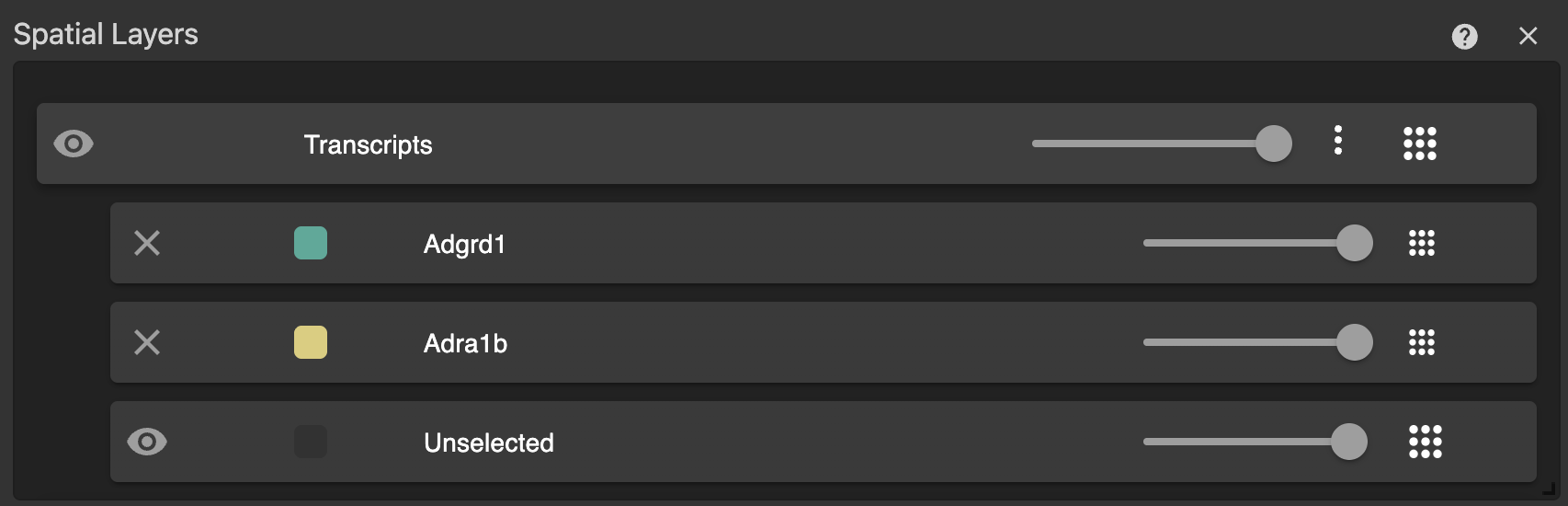
The point layer row contains:
| Row | Controls |
|---|---|
| Layer (e.g. Transcripts) | Visibility, layer color, layer opacity (spatialLayerOpacity), and options menu (color encoding, filter to feature selection, colormap, tooltips, legend). |
| Feature (one per selected feature) | Remove the feature from the selection, set its color, and set its opacity. Stored in featureColor. |
| Unselected | Show or hide points whose feature is not selected (toggles featureFilterMode), and set their opacity (spatialLayerOpacityUnselected). Unselected points use the theme's default color. |
Opacities multiply down the hierarchy (see Point layer opacity). For example, a layer opacity of 0.5 and a feature opacity of 0.5 render that feature at 0.25.
When features have sub-rows, the layer row's color is not editable, because colors are set per feature. With no features selected, the layer row's color sets spatialLayerColor, which is applied to all points.
Per-feature colors and opacities only apply in Feature Color mode:
obsColorEncoding | Feature color | Feature opacity |
|---|---|---|
geneSelection (Feature Color) | editable | editable |
spatialLayerColor (Static Color) | uses the layer color | not applied |
randomByFeature | assigned from a palette | not applied |
random | random per point | not applied |
Example
config.linkViewsByObject([spatialView, lcView], {
  pointLayer: CL([
    {
      fileUid: 'merfish-points',
      obsType: 'point',
      featureType: 'gene',
      spatialLayerLabel: 'Transcripts',
      spatialLayerVisible: true,
      spatialLayerOpacity: 1,
      spatialLayerOpacityUnselected: 0.1,
      obsColorEncoding: 'geneSelection',
      featureSelection: ['Ada', 'Adgre5'],
      featureColor: [
        { name: 'Ada', color: [255, 0, 0], opacity: 1.0 },
        { name: 'Adgre5', color: [0, 128, 255], opacity: 0.5 },
      ],
    },
  ]),
});
Features selected without a featureColor entry are automatically given a color from the default palette and an opacity of 1.